What’s new in Rovo: The latest AI capabilities from Atlassian
Brett Celliers
09 March, 2026

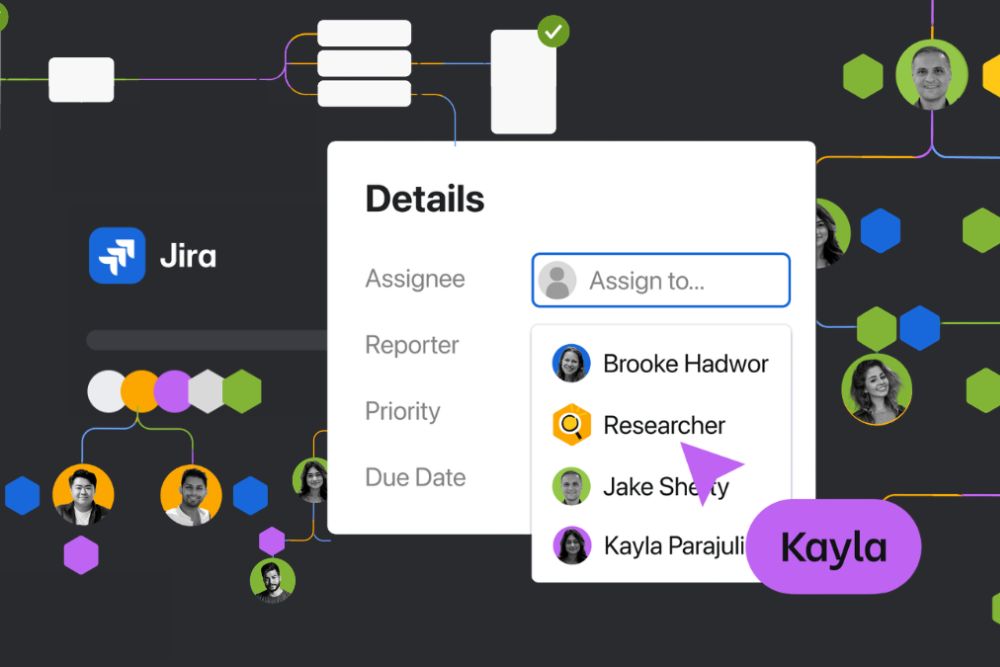
Atlassian has been steadily expanding what Rovo can do across the Atlassian platform. Recent releases show a clear shift from AI as a chat assistant to AI as something embedded directly into how work actually happens.
Instead of jumping between tools or prompting an isolated AI assistant, Rovo is increasingly designed to operate inside Jira, Confluence, and your broader tooling stack.
Several new capabilities highlight where things are heading. From AI agents working directly in Jira, to deeper reasoning capabilities and content creation in Confluence, the focus is clear: help teams automate routine work while keeping everything anchored to the systems where work already lives.
Here are the updates worth paying attention to…
Assign work to AI agents directly in Jira
One of the most interesting developments is the introduction of AI agents that can operate directly inside Jira projects.
Instead of interacting with AI separately, teams can now assign work items to an agent just like they would assign them to a teammate. Agents can also be brought into conversations by mentioning them in comments, allowing them to assist with tasks such as summarising discussions, analysing information, or proposing next steps.
The important part is that all of this happens within Jira’s existing structure.
That means:
- Agents follow the same workflows as human teammates
- Permissions and project configurations still apply
- All activity is captured in Jira’s audit history
This approach solves a common problem with AI tools today. A lot of AI-driven work happens in side conversations that never make it back into the system where the work is tracked. By keeping everything in Jira, teams can experiment with AI without losing visibility or governance.
Another useful capability is embedding agents directly into workflows. For example, an agent could draft an onboarding flow, summarise a design discussion, or prepare documentation when a ticket reaches a specific workflow stage.
This is an early glimpse of how human and AI collaboration could evolve inside Jira over time.
Build custom AI workflows with Rovo Studio
Beyond using pre-built agents, Atlassian is also introducing Rovo Studio, which allows teams to create their own AI-powered workflows.
Instead of relying on basic prompts, teams can design agents that perform multi-step processes across Atlassian tools. These agents can be created using natural language instructions and then tested and refined before being deployed.
Importantly, this has been designed with enterprise environments in mind.
Rovo Studio includes governance features such as:
- Granular permission controls
- Audit logs for agent activity
- Human approval checkpoints
The goal is to allow organisations to automate meaningful work without sacrificing oversight or security.
For teams already investing in automation, this creates an opportunity to move beyond simple rules and start building more intelligent workflows.
Connect Rovo to the rest of your tool stack with MCP
One of the biggest limitations of AI tools today is context. They can be powerful, but they often lack access to the systems where your data actually lives.
Atlassian is addressing this through Model Context Protocol (MCP) integrations.
MCP allows Rovo agents to connect to third-party applications such as Amplitude, Canva, Figma, GitHub, Intercom, and HubSpot. Once connected, agents can access live data, perform tasks, and combine information across multiple tools without requiring custom integrations.
In practice, this means an agent could:
- Pull product metrics from Amplitude
- Retrieve design files from Figma
- Reference project work in Jira
- Draft launch documentation in Confluence
All within the same workflow.
Instead of switching between systems to gather context, Rovo agents can connect the dots across your existing tool stack and bring that information together in one place.
For teams managing complex cross-functional work, this could become one of the most powerful aspects of the platform.
Stronger reasoning with Rovo Think Deeper
Another update focuses on improving the quality of AI responses.
Rovo now includes a capability called Think Deeper, designed for situations where a quick answer is not enough but a full research report would be excessive.
When Think Deeper is engaged, Rovo breaks a request into multiple subtasks, works through them methodically, and verifies the results before returning an answer.
In simple terms, it moves AI from “responding” to reasoning.
The system dynamically decides when deeper reasoning is needed, but users can also trigger it manually when tackling more complex problems.
Typical use cases include:
- Analysing information across multiple Jira issues
- Comparing different solution approaches
- Updating documentation to reflect recent changes
- Drafting structured outputs based on multiple sources
The goal is to strike a balance between speed and depth, giving teams more thoughtful answers without requiring the longer processing time associated with full research-style AI workflows.
AI-powered content creation in Confluence
Rovo is also becoming more deeply embedded in Confluence content creation.
Instead of starting from a blank page, teams can now describe the content they want and have Rovo generate a first draft instantly. This works across different types of content, including pages, whiteboards, and databases.
The generated content can pull context from:
- Existing Confluence pages
- Jira issues and project work
- Loom recordings
- External tools such as Slack or Google Drive
Once a draft exists, Rovo can also help refine it by adjusting tone, condensing text, or improving clarity.
For teams that produce large amounts of documentation, this removes a lot of the manual effort involved in creating and maintaining content.
What this signals about the future of Atlassian AI
Taken individually, each of these capabilities is useful. But the bigger story is how they fit together.
Atlassian is clearly positioning Rovo as more than just another AI assistant. Instead, the aim is to embed AI directly into the systems where teams already collaborate and manage work.
A few themes stand out:
AI that works inside your existing tools
Rather than pulling teams into a separate AI interface, the focus is on integrating intelligence directly into Jira and Confluence.
Human and AI collaboration
Agents can assist with work, but the human workflow and governance model remain intact.
Context across your tool stack
Through MCP integrations, AI can connect data from multiple systems instead of operating in isolation.
Automation with oversight
Features like audit trails, permission controls, and approval checkpoints recognise the realities of enterprise environments.
This approach reflects a broader shift in how organisations are adopting AI. The real value rarely comes from standalone AI tools. It comes from embedding AI directly into everyday workflows.
Looking ahead
Rovo is evolving quickly, and these latest releases show Atlassian’s clear focus on embedding AI directly into the tools teams already use to plan, track, and collaborate on work.
While many of these capabilities are still early, they signal a shift toward AI that works alongside teams inside Jira and Confluence, rather than in disconnected assistants.
If you’re curious how Rovo could work in your Atlassian environment, our team would be happy to explore it with you. Let’s talk.
Recent Posts

The Jira Life Down Under: Key Takeaways from Our Session on Atlassian's Pricing Changes
What Shipped in August: Atlassian, Asana and ClickUp All Made the Same Bet