Asana Goals and OKRs: What the Live Demo Actually Showed
Clayton Coetzee
13 July, 2026

Our last session, From OKRs to Outcomes: Closing the Visibility Gap, was all theory. We talked about why leaders lose sight of how day to day work ladders up to strategy, and what that disconnect costs when nobody catches it early.
This session was the practical follow up. Clayton Coetzee from Elegance Group and Brandon Huang, a Solutions Engineer from Asana, sat down to actually show what closing that gap looks like inside the platform. No feature dump, no how to guide. Just a walkthrough of how a goal cascades from company level all the way down to an individual task, and how that visibility flows back up again.
Here’s what stood out.
The problem most goal setting has
Brandon opened with a pattern a lot of us will recognise. Leadership sets goals at the start of the fiscal year, builds the big deck, presents it with the theatrics, and then nobody talks about it again until the year end review. Goals end up being a moment rather than something that’s actually front and centre for the people doing the work.
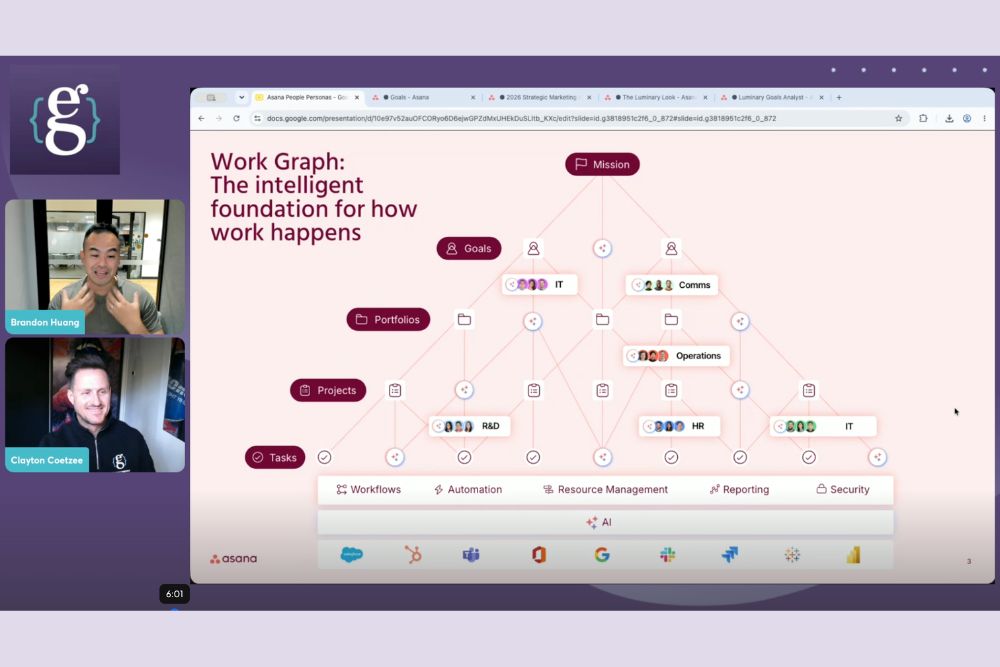
Asana’s answer to that is the “work graph”: one connected system running from the company mission, down through goals, portfolios, projects and tasks, with visibility flowing in both directions. Set a goal at the top and individual contributors can set their own KRs underneath it. Complete a task at the bottom and that progress rolls straight back up.
Seeing it in one view
The demo used a fictional company, Luminary Marketing, to show a live strategy map. Anyone in the org can see the top line objectives, how they’re tracking (on track, at risk, off track), and which key results sit underneath each one.
Clicking into a single goal shows who owns it, the timeframe, and a clear definition of success. This is where Asana’s AI comes in. Give it a rough draft of a goal and it’ll shape it into a proper SMART goal, then suggest both a definition of success and the context for why the goal matters in the first place, so it doesn’t land as something someone made up out of thin air.
Different views for different people
Not everyone needs to see everything, and Brandon was upfront about that. A department portfolio view aggregates all the relevant projects for that team, with a rule of thumb that whatever’s on screen should be fifty to eighty percent relevant to whoever’s looking at it.
Individual contributors get an even simpler version: a “my work” view that just shows the projects and tasks they own, with the option to still dip into the wider strategic view if they want it.
The bit that actually matters: work flows back up on its own
This was the clearest example in the whole session. Mark a task complete at the project level, and that completion automatically updates the portfolio. Because the project is linked to a goal, the goal’s own progress bar updates too, no one has to manually chase it up.
That’s the real point of the work graph. Whether you’re an individual contributor on the ground or the exec who owns the goal, the system keeps everything connected without extra admin.
AI writing the status updates, not the humans
Asana’s AI was used to draft a project status update, pulling only from what had actually happened in the project: tasks completed, comments left, dates moved, that kind of thing. Brandon made a specific point of it not hallucinating, since it’s working off the project’s own data rather than a general model guess.
There’s also a “teammate” agent that can be handed a broader task, like reviewing a department’s entire portfolio against the company’s objectives and flagging any KRs that aren’t currently being supported. It’s a genuinely useful way to spot gaps before they become a problem at review time.
Answering the questions that came up
A few good questions came through from the audience:
- Can Asana pull in real business metrics from elsewhere? Yes, through integrations or the open API. If the data (like a sales metric) sits in another system, it can be pulled into Asana rather than tracked manually.
- Does Asana try to replace tools like Jira or Slack? No. Brandon was clear that Asana isn’t trying to build out every capability of every other tool. It integrates instead, with a two way sync into Jira as one example.
- Can progress be measured differently across teams? Yes. Some teams might track task completion, others story points or time logs. Progress sources can be set manually or tied directly to a project, milestone, or even the KR level, so each team can define success in a way that suits how they actually work.
- Can one KR link to multiple objectives? Yes, goals, portfolios, projects and tasks can all connect to more than one parent. Asana calls this multi-homing, and it’s what allows the same piece of work to be visible from more than one strategic angle.
Want to see it for yourself?
If you want the full walkthrough rather than the summary, the recording is available on demand.
Register to watch the recording here.
If it sparks a question about your own setup, or you’re curious what a health check on your current environment would look like, get in touch with Elegance Group. We’d love to dig into it with you.
Recent Posts

The Jira Life Down Under: Key Takeaways from Our Session on Atlassian's Pricing Changes
What Shipped in August: Atlassian, Asana and ClickUp All Made the Same Bet